Chapter 1 · Cast off
Quickstart
What Sailor is, and your first ten minutes.
New here? Everyone starts here. It's short, I promise.
1.1Start here
One loop engine. Labs that put it to work.
Hard work is mostly a loop: try, judge, fix, try again. Sailor's crew runs it for you until the work passes, and you get the proof. Each Lab points that loop at a different kind of work.
One loop. Many Labs.
A Lab is a world to work in and a judge that decides when it is done. Sailor brings the rest, the same every time.
Lab
Its world
Its judge
Sailor's loop


The crew, the plan and the record. Try, judge, fix, try again, until the judge says it works.
The same in every Lab
Software Lab
Live
WorldYour codebase, running
JudgeTests, a reviewer, and your app clicked through in a real browser
Simulation Lab
In the works
WorldA robot in a physics simulator
JudgeA frozen eval, and the run watched on video
The next one
Later
WorldAny work that can be tried
JudgeAnything that can say pass or fail
Built on Anchor SDK
Under every Lab is the Anchor SDK, our own open-source agent runtime. Every Lab runs on it, the ones to come included.
anchor-sdk.dev- The loop
- Model, tools, results, turn after turn.
- Any sandbox
- A microVM, a GPU, Docker or a laptop.
- Never loses its place
- It survives crashes, and every step is on record.
The first Lab
The first Lab is the Software Lab. It takes a goal and a repository and returns a pull request that was run, reviewed and checked in a real browser.
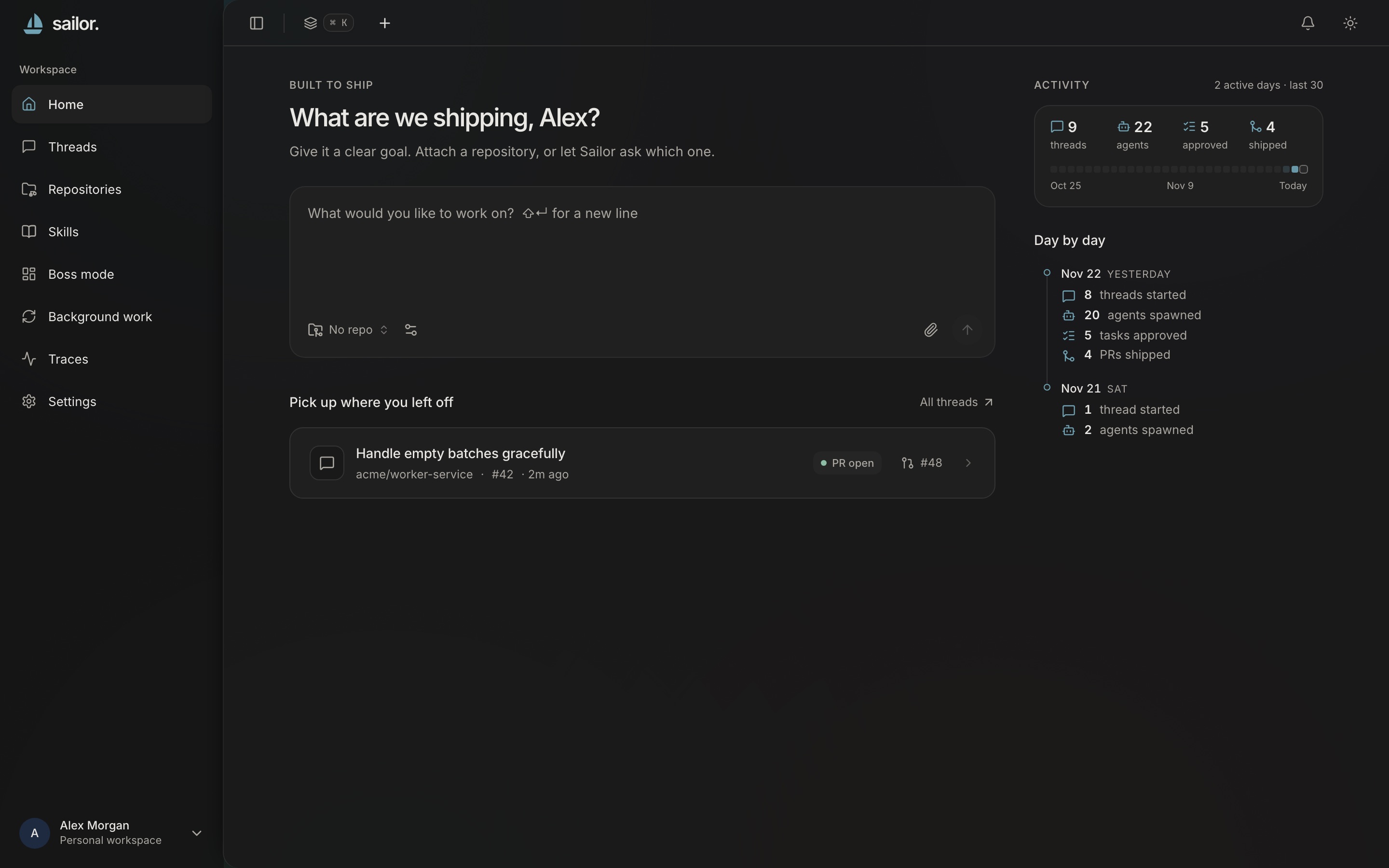
The Software Lab's home: give it a clear goal, and attach a repository or let Sailor ask which one.
- Threads, not prompts
- Start from a goal. A thread carries one conversation, its sandbox and every run that follows.
- Isolation by default
- Every thread works in its own isolated microVM. Nothing the agent does can reach your machine.
- Durable runs
- Work survives a lost worker, a spent budget, or an answer you give an hour later.
- Evidence before delivery
- Screenshots, recordings, test results and a trace come with the work. Anything it could not confirm is named, and the pull request opens as a draft.
- Questions that pause
- When the crew needs you it stops, asks, and resumes the same conversation and sandbox when you answer.
- Traces, not guesses
- Each run writes a journal of steps, tokens, cost and duration, and a pull request links to it.
- GitHub when you want it
- Issues, CI failures and review comments can wake a thread.
- Secrets stay server-side
- A key is decrypted for one command and scrubbed from everything the agent sees or writes.
1.2Start here
Your first ten minutes
From sign-up to a first piece of work. The order below is the order the app walks you through.
- 1
Get in
Sailor is in early access. Join the waitlist at the sign-in page, or accept an invite. Early users also receive welcome credit; see Credit and billing. - 2
Open the workspace
The workspace opens in the Software Lab. First-run setup takes a few short steps, and you can change every answer later. - 3
Finish the setup
Setup asks for six short steps: yourName,Verifyyour email,ConnectGitHub, pickRepositories, yourStyleof working, andWake. Everything you choose is only a default. - 4
Start a thread
On the Software Lab's home, write what you want in the composer, type or speak it. Pick a repository, or none and Sailor will ask. - 5
Follow it, answer it
Watch the steps and the live view. If the Captain needs you, it asks, and the bell lights. Answer whenever you can; the thread waits. - 6
Take the result
The work ends in a pull request with evidence and a trace.
Software Lab home: give it a clear goal, and attach a repository or let Sailor ask which one.
Next: core concepts, then the Software Lab.
1.3Start here
Six words that carry the rest
Everything in Sailor is built from these. Learn them once and every page makes sense.
Anatomy of a thread
survives a lost workerthread
One conversation
Your messages, the Captain's answers, every question and its reply.
One repository
Optional. Software work lives on the thread's own branch.
One retained sandbox
An isolated microVM that is kept between runs, so a later answer picks up where it stopped.
- Threadyour unit of work
- One goal, one conversation, one sandbox, every run that follows. Threads are listed in the Software Lab and owned by you.
- Runone stretch of work
- A single execution of the crew inside the thread. A new run starts when you reply, a review comment arrives, or CI fails.
- Captainyour one contact
- The agent you talk to. It plans, delegates, asks you questions, and decides when work is ready. It never does the specialist work itself.
- Crewspecialists
- A researcher, a prototyper who drafts the screens, builders, a reviewer, a verifier who uses your running app, and an environment member who works out how to boot it.
- Evidenceproof of work
- What a step leaves behind: test results, screenshots, recordings, a verdict. What it could not confirm is said, never hidden.
- Tracethe journal
- A run's record of steps, tokens, cost and duration. Open it from the Traces page or from the pull request.
Who sees what
- Threads, runs and secrets are owned by you. Another account never sees them.
- A GitHub installation can be shared with teammates you invite. A member sees only the repositories GitHub says they can reach.
- Nothing reaches GitHub until an explicit publish step runs, and that step re-checks access first. Work with anything unconfirmed opens as a draft pull request.