Chapter 2 · The Software Lab
Software Lab
From a sentence to a pull request, with receipts.
I write it. The reviewer picks it apart. The verifier proves it.
2.1Software Lab
From a goal to a pull request.
Describe the outcome. Sailor plans it, builds it in an isolated microVM, and checks it in a running preview before anything reaches GitHub.
“Let team admins invite people by email”

Stage 1 of 7 · Captain
Goal
You describe the outcome in plain words, typed or spoken. Attach a repository if the work lives in one, or let Sailor ask.
You:Write the goal. Pick a repository and autonomy if you want to.
what the run writes
›thread created
›repository: acme/web (attached)
›autonomy: autopilot
Press a stage to jump to it, or let it play. Each stage is owned by one member of the crew, and each leaves evidence behind in the thread. Here is what a real one looks like when it stops to ask you:
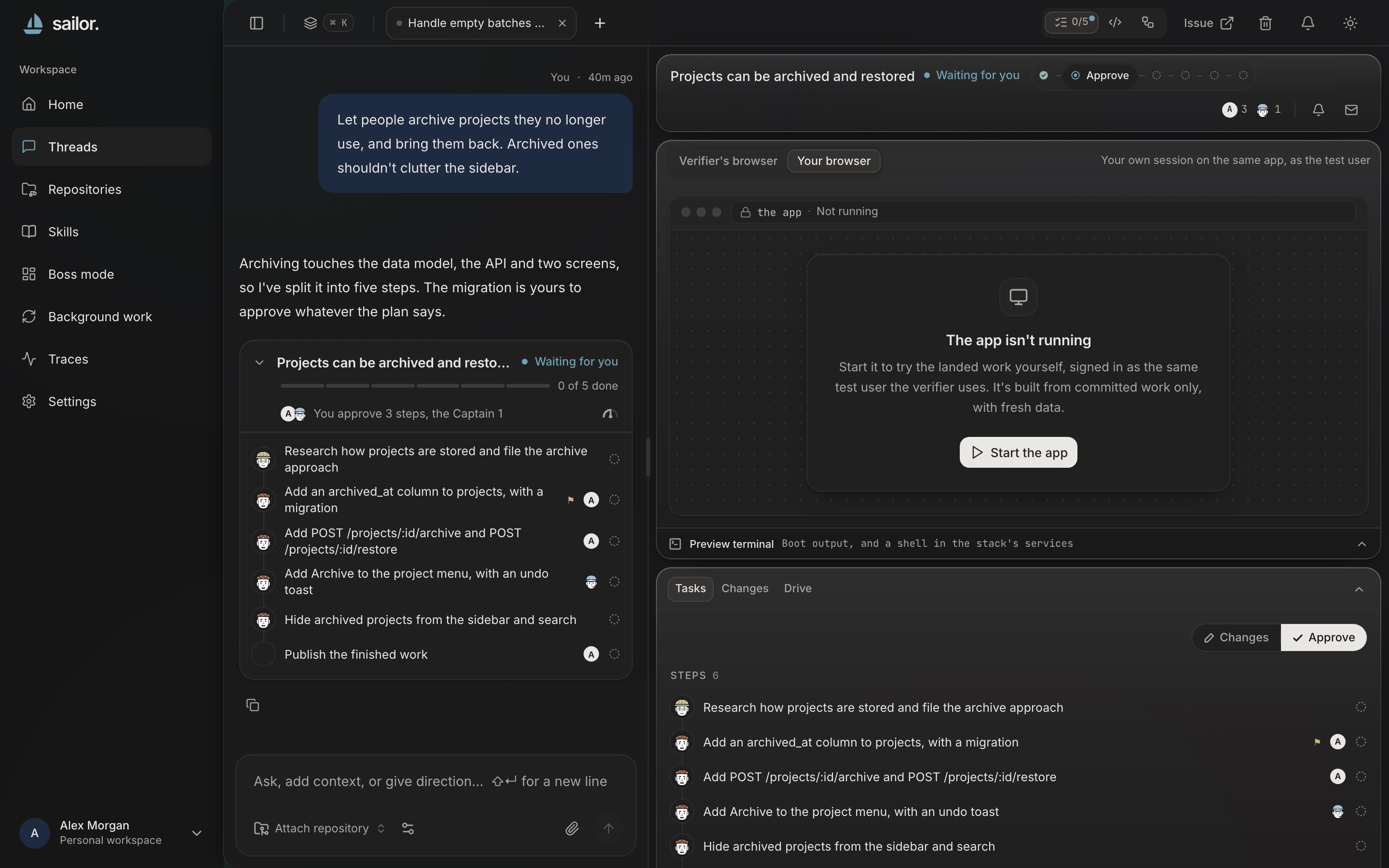
A real thread, waiting at the plan. Point at the numbers.
What you will see on a thread
A thread opens on its conversation with the Studio beside it: the work card on one side, the stage on the other.
| Part | What it holds |
|---|---|
| Tasks | Every step of the plan with its owner and state, and where you approve or dismiss. Open a step for its facts and the changes it made. |
| Editor | The crew's code as it is written. In the work card: the files of the tree you are watching, opened to the file the crew is on, and Source control, the thread branch and each builder's own worktree with what it has not committed yet and the commits on its branch. Opening it puts the editor on the stage: a strip names who is at work (slide between them with ← →); the files they read and edit open as tabs, each as its diff or its source, with the lines they read or changed marked. |
| Drive | The pull request, the Captain's reports and what the crew filed. |
| Verifier's browser | The verifier driving your app, live, then its recordings. |
| Your browser | The app in your own session, signed in as the same test user. |
While the crew works, the stage follows it: the editor while a builder or researcher is at work, the verifier's browser while it drives. The editor has one header: the crew as faces (click one to watch it; ← → step through), what it is doing, and Browser to put a browser on the stage. It watches whoever acts, holding on one member while it is busy, and moves on once that one is done. Scrolling or opening a file pauses it while you read; it picks itself back up after a quiet moment, or at once with Resume. A command that reads no file (installing, testing) shows in a small terminal under the file.
Talking to a running thread
- Send a message while it runs to interject: the crew takes it into account on its next move.
- Stop one member of the crew from its chip in the editor, with a word for the Captain. Its branch and changes are kept, the rest keep working, and the Captain asks you what next.
- Select code in the editor to ask about it or clip it for your next message.
- Use Ask the Captain on a waiting decision to ask why, or to suggest something different. It answers and presents the decision again; it is not an approval.
- You can park a plan to set it aside without losing it, and pick it up later.
- Close the tab whenever you like. The run is on the server, and the thread is waiting when you return.
2.2Software Lab
The crew, and what each member may touch
The Captain and five specialists, each a job rather than a surface. The Captain talks to you; everyone else works for the Captain.
Pick a face

Captain
Talks to you, plans, delegates and decides.
Owns
The plan, the design doc you approve it from, each step's brief, approvals, questions to you, the final publish.
Never
Edits code itself.
The roles are deliberately narrow. A reader cannot edit, a reviewer cannot ship, and the verifier tests what builders wrote but never edits it, so nobody grades their own work. The environment member works out how your app boots, once per thread; the verifier boots it, and repairs it when it will not start. The Captain starts workers in the background and is woken when they hand back, so nothing blocks the conversation.
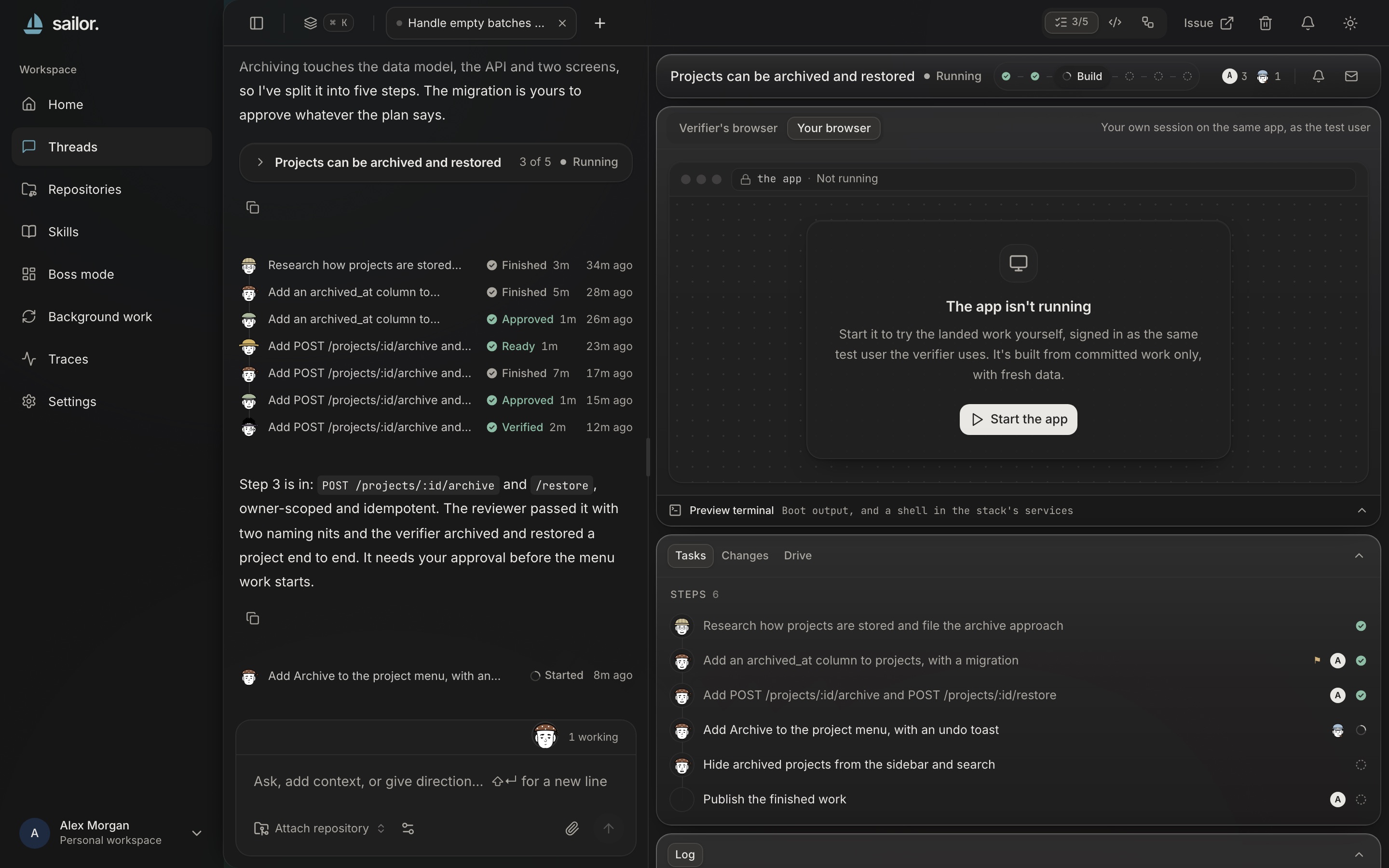
A real thread, mid-build. Every worker gets a row; the right pane keeps the steps.
2.3Software Lab
How much you steer
One dial, set once as your default and changeable on any thread: who approves each step. Every task is cut into steps the same way.
Who approves
The plan
Let team admins invite people by email
0 / 5
wait for you
- Learn the teams and auth coderesearcherCaptain approves
- Invite tokens and storagebuilder-1carries riskYou approve
- Route, email and dialogbuilder-2shapes what followsYou approve
- Review the diffsreviewerCaptain approves
- Verify in the running appverifierCaptain approves
And this is what a step looks like when it does wait for you:
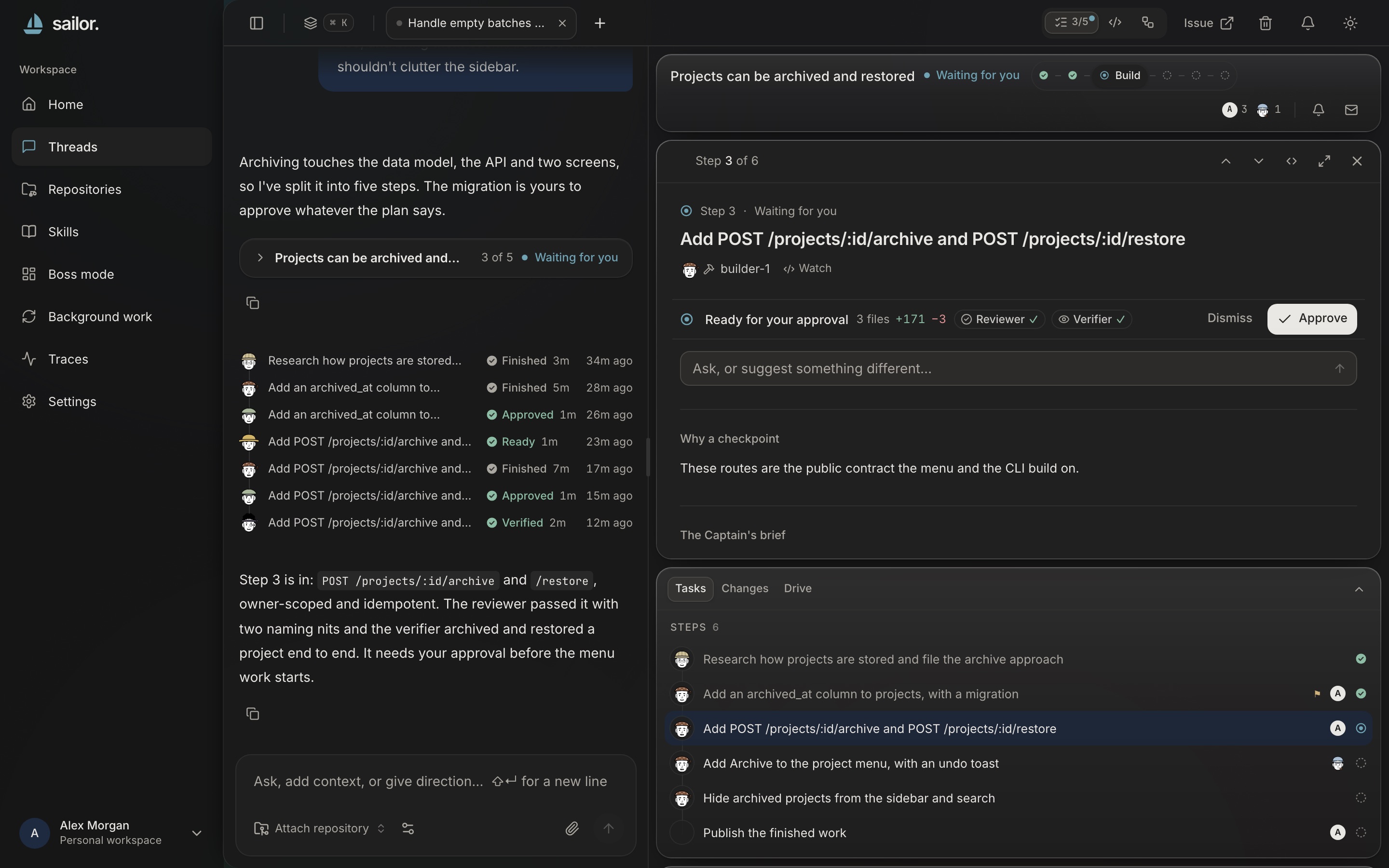
Step 3 is ready because the reviewer and the verifier already passed it. Only the approval is left.
Where you can change it
| When | Where |
|---|---|
| Before the thread has a plan | From the composer: the thread's own setting. |
| While the plan waits for approval | On the plan card. The Captain revises the plan. |
| Once it runs | From the composer's gear, or by asking in the conversation. The Captain is told: on Autopilot it plans what is left to the end; back on Co-pilot the steps running finish and nothing new starts. |
Co-pilot goes card by card
On Co-pilot nothing runs before you say so. Each piece of work is a card in the chat: what landed since you last heard (each step with its files, which open to their diffs, and the reviewer’s verdict), then what comes next and why, with every step it would run. Open a step to see what it will change. Go ahead starts it; your own words change it. The next piece can be several things at once: two researchers, a build beside a review, builders in parallel. The plan grows on the side from what you approve, and the task is finished when you say so on the last card. Say something like “go ahead and build the rest” and the Captain offers to take it from there on Autopilot: the offer counts down in the composer and switches by itself unless you stay on Co-pilot or send another message. Your go-ahead approves the plan it writes for the rest.
When a step is checked
For each step you may choose when the approval gate falls:
| Timing | Meaning |
|---|---|
| Before it starts | Approve what it will change. |
| After it's done | Approve what it found or made. |
| Before and after | Approve the intent, then the result. |
Next: connect a repository.
2.4Software Lab
Repositories and GitHub
Sailor works in your repositories through a GitHub App: your installation, scoped tokens, a bot identity. No personal access tokens.
- 1
Connect GitHub
In setup (orSettings → GitHub) install the Sailor GitHub App on your account or organisation. - 2
Add repositories
InSettings → Repositories, press add and search your installation. Only repositories you switch on are ever touched. - 3
Let it learn the app
The first time a thread needs the app running, the environment member works out how to boot it: install, migrate, seed, sign in. It runs in the background while the plan gets going, or when you press Start the app, and the result is a recipe you can inspect and re-run. - 4
Start a thread on it
Pick the repository in the composer. Leave it empty and the Captain asks you which one.
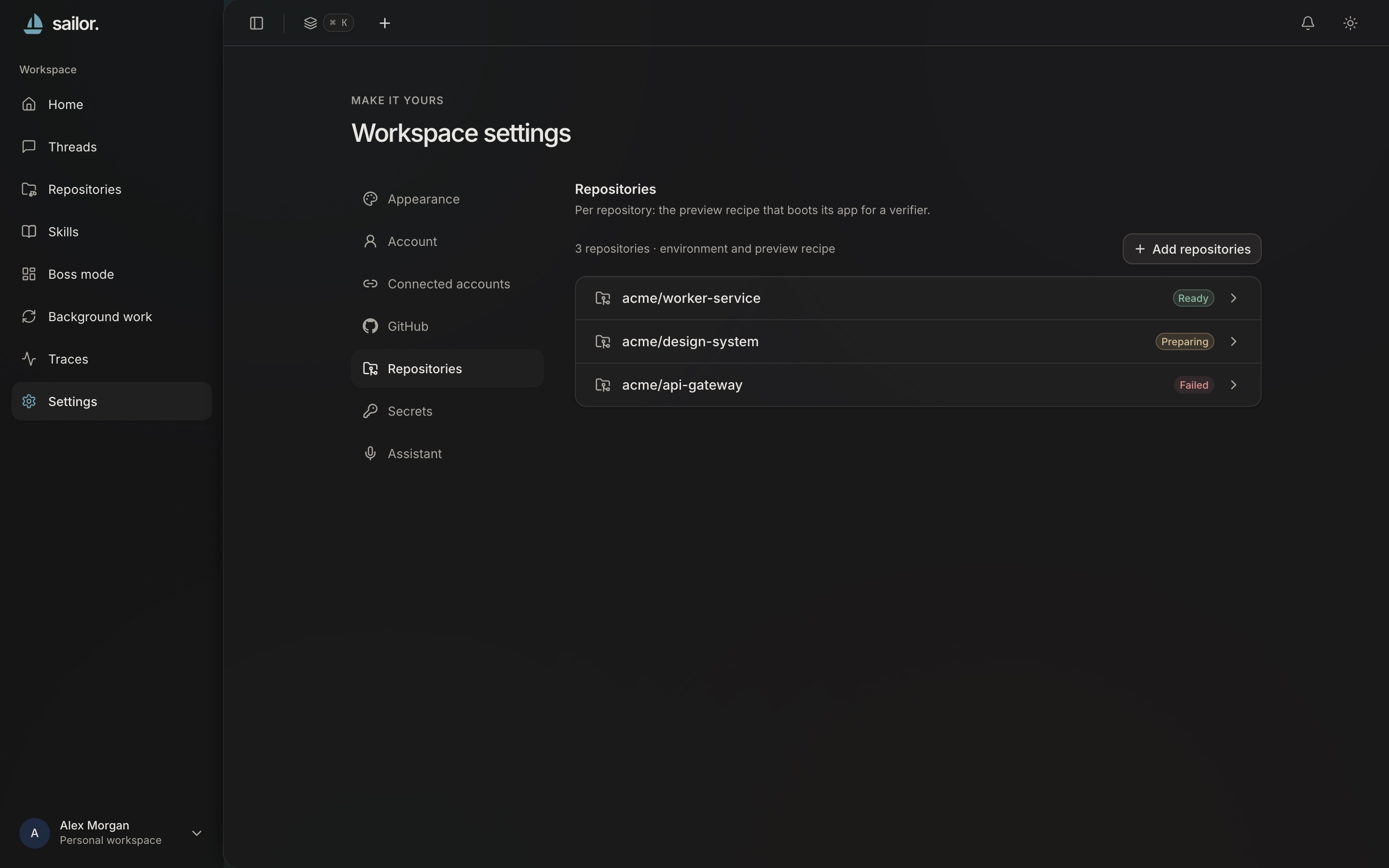
Settings → GitHub: each repository carries the recipe that boots its app for the verifier.
What the app may do
| Permission | Level | Used for |
|---|---|---|
| Contents | Read and write | Clone, and push the thread's own branches |
| Issues | Read and write | Read issues, label, comment |
| Pull requests | Read and write | Open pull requests, reply to reviews |
| Checks | Read only | See CI status |
| Metadata | Read only | Required by GitHub |
Ways in
- The composer
- Write a goal on the lab's home. The most direct way.
- An issue
- Label an issue
sailor:fixon an enabled repository and Sailor starts a thread from it. - CI and reviews
- A failing check or a review comment on a pull request wakes the same thread; the crew replies and pushes a fix.
Sharing a repository
The owner installs the Sailor GitHub App on the repository. A teammate signed in with GitHub connects it from the Repositories page, matched by their GitHub login. They are added only once GitHub confirms their login can reach the repository, and they see only those repositories. Threads stay private to whoever started them.
2.5Software Lab
Proof before a pull request
The crew does not say it works. It runs it, drives it, and keeps the receipts.
- The repository's own tests run in the sandbox. The crew reuses a clean result on an unchanged tree instead of re-running it.
- A review of every diff, with a security checklist that always runs.
- A real browser. The verifier boots your app from its recipe, signs in with a test account, and drives the change like a user would.
- Evidence kept with the thread: screenshots, recordings with a poster frame, and a written report.
Open Your browser in the thread's Studio to use the running app yourself while the verifier works, signed in as the same test user. Press Start the app if it is not running. The app and the recordings live with the thread; nothing is left running on your machine.
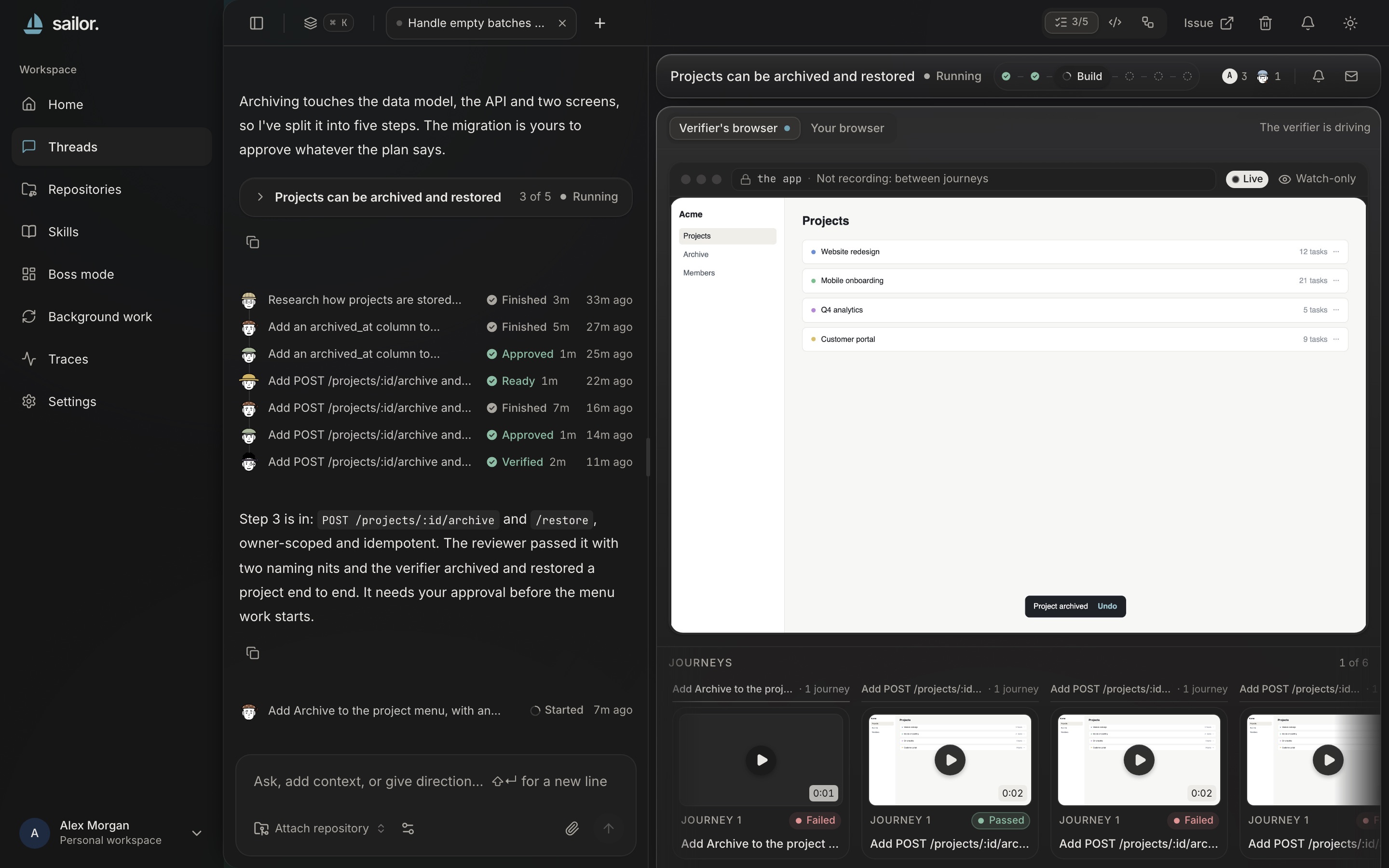
The verifier's flows, step by step. A flow that failed says where and why instead of hiding it.
2.6Software Lab
Delivering the work
Nothing is published by accident. Delivery is an explicit step, and it carries its proof.
- 1
The crew finishes the plan
Every step is done, reviewed and verified. Anything that could not be confirmed is named, and the pull request then opens as a draft. - 2
Publish re-checks
Access to the repository and the evidence are verified again at the moment of delivery, not just when the thread began. - 3
A pull request opens
On the thread's branch, with a description, the evidence and a link to the run's trace. - 4
You merge
Review it on GitHub like any other pull request, and merge it when you are happy.
After a pull request: a failing check or a review comment reopens the thread, and the crew answers on the same branch.
2.7Software Lab
Skills
Instructions the agent loads only when a task matches them. They teach the crew how you work.
Planning
Quality
Debugging
Security
Frontend
Environment
| Kind | Where it lives | Who it is for |
|---|---|---|
| Built-in | Ships with Sailor | Everyone. Shown on the Skills page, with a sample of them above. |
| Repository | .sailor/skills/<name>/SKILL.md | Everyone on that repository. Found when a thread checks it out. |
| Your own | Skills page → Add a skill | You, in every thread. |
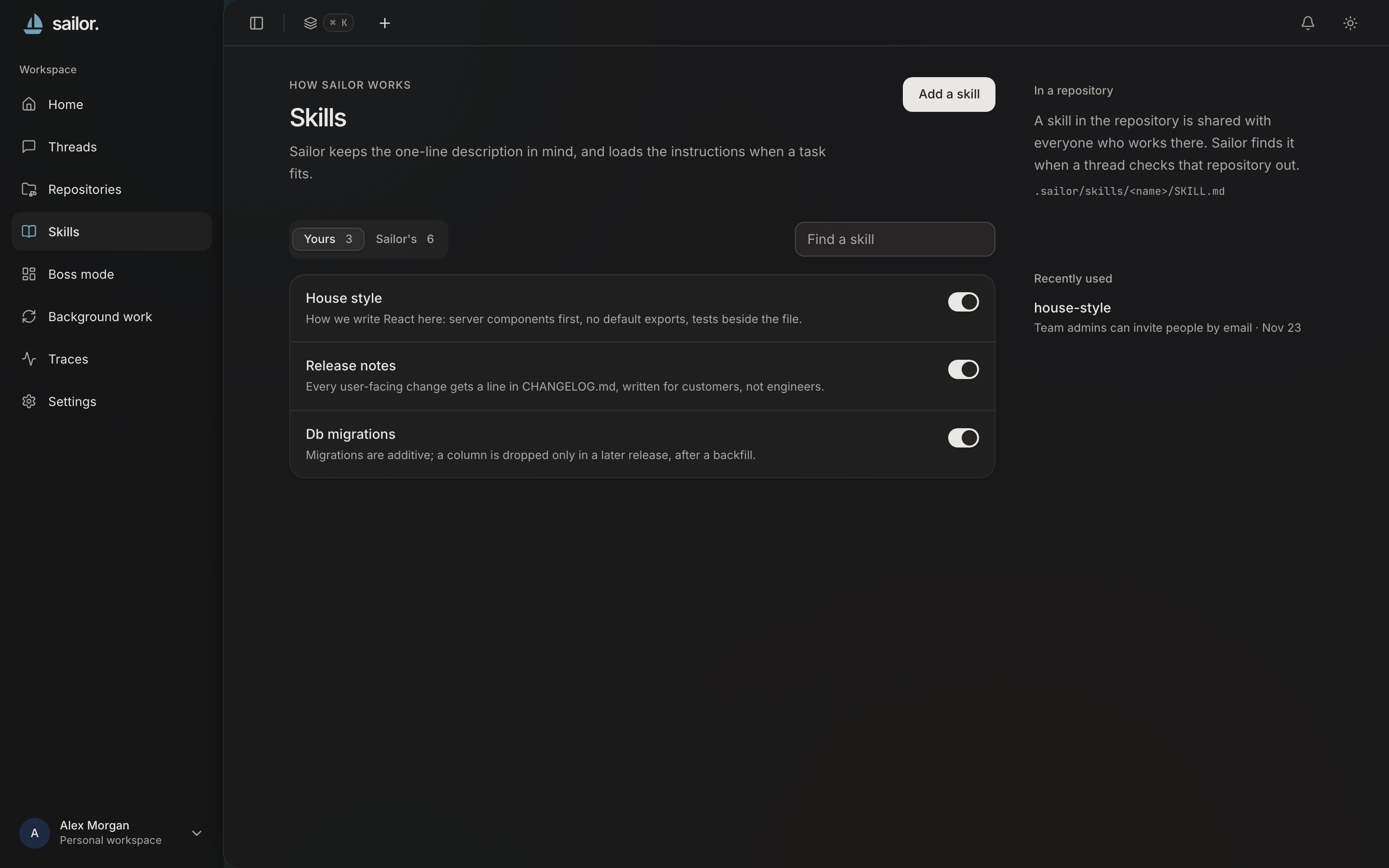
The Skills page: built-in, repository and your own.
2.8Software Lab
Background work
Jobs that run on hidden threads, so you can keep working while they finish.
Today that is a repository's environment setup. The Background work page lists each job with its status and how long it has run, and tails what the agent is doing as it happens. It checks every two seconds while something is running, and stops when nothing is.
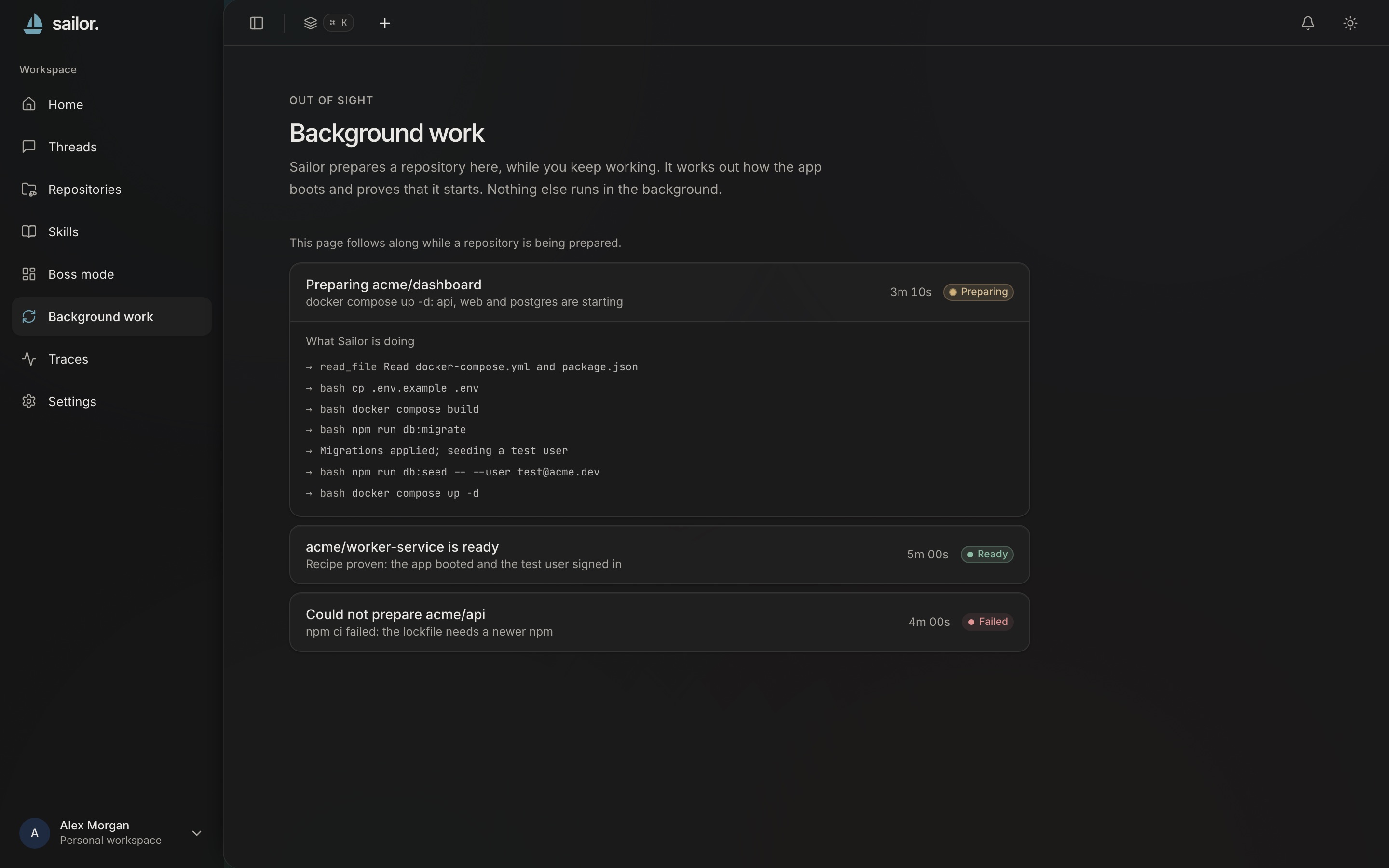
Background work: jobs on hidden threads with a live tail.
Next: around the workspace, Boss mode.